How to get XUnit v3 to work with Test Explorer in VS Code

I recently upgraded some xUnit v2 test projects to v3 because I needed two awesome features that v3 introduced:
Assembly Fixtures: These allow a fixture instance to be shared between all tests in multiple classes, rather than between tests in a single class as
IClassFixturehad allowed up until v2.Automatically serialization of test case objects in
TheoryDataclasses. This means that this unbelievable clunk:public class TestCase_ValidProduct : IXunitSerializable { public required string TestCaseName { get; set; } public required CreateProductArgs NewProduct { get; set; } public void Deserialize(IXunitSerializationInfo info) { XUnitSerializationHelper.Deserialize(this, info); } public void Serialize(IXunitSerializationInfo info) { XUnitSerializationHelper.Serialize(this, info); } }reduces to:
public class TestCase_ValidProduct : IXunitSerializable
{
    public required string TestCaseName { get; set; }
    public required CreateProductArgs NewProduct { get; set; }
}
The price of this upgrade was that Test Explorer in VS Code either couldn't discover tests, or would show them as "Skipped" and refuse to run them:
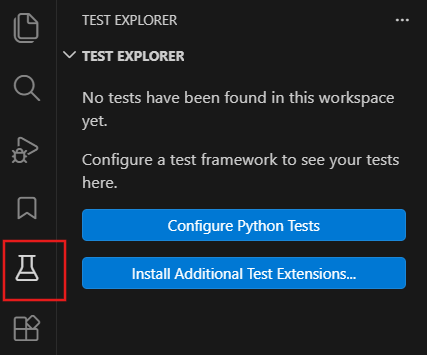
Exactly the same thing happens when I scaffold a new XUnit 3 project using dotnet new xunit3.
These problems seem to stem from the fact that xUnit v3 uses the new Microsoft Test Platform (MTP) which is a replacement for the older VS Test platform, but C# Dev Kit extension in VS Code - which is responsible for discovering tests in a C# test project and providing these to the Test Explorer window - does not work properly with MTP (yet!).
It is worth mentioning that both VS Test and the newer MTP are test execution platforms - they are agnostic to the test harness used in test projects and works with any test harness e.g. MS Test, xUnit and NUnit.
I fixed the issues by making the test projects use the older VS Test platform instead that C# Dev Kit does work with.
These are the steps that you can take to make an xUnit v3 project - whether upgraded from v2 or newly scaffolded - work in Test Explorer in VS Code:
Delete
<PackageReference>toxunit.v3.mtp-v2or just comment it out in the.csprojof your test project:<!--<PackageReference Include="xunit.v3.mtp-v2" Version="3.2.2" />-->Then add the following references:
dotnet add package xunit.v3.mtp-off dotnet add package Microsoft.NET.Test.Sdk dotnet add package xunit.runner.visualstudioxunit.v3.mtp-offis a version of xUnit v3 package that has MTP support disabled and is a replacement forxunit.v3.mtp-v2that I deleted above.Microsoft.NET.Test.Sdkprovides targets and properties for building .NET test projects, regardless of the test harness - xUnit, NUnit, MS Test etc. - that they use. It is required for integrating the project with the VS Test platform.xunit.runner.visualstudiois the xUnit-specific adapter for VS Test
Then reload the window (bring up the Command Palette using shortcut key Ctrl+Shift+P or F12, then type Reload Window and press Enter), and press Refresh Tests button in Test Explorer:
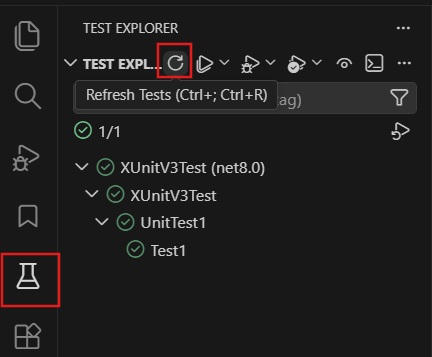
You should now be able to see and run your tests.
The slight caveat is that individual TheoryData tests cases in a [Theory] test do not appear as separate tests cases like they used in the Test Explorer with xUnit v2. But I am happy to sacrifice this granularity for being able to use the shiny new features in xUnit v3.
